Zero
hours a month chasing invoices
Dunwell tracks your Net 30/60/90 invoices, sends the reminders, and auto-charges the saved card on the due date when a buyer has one on file. Built for Shopify wholesale stores on Shopify Payments.
Installs in dry run. Nothing is sent or charged until you say go. Works on non-Plus stores with Shopify Payments.
Three things happen to every net-terms order. Dunwell does all three, on the schedule you set.
An escalating email ladder goes out on your behalf, from a heads-up before the due date to firm follow-ups after. Multiple contacts, past 30 days, your copy and reply-to.
On the due date, for buyers who saved a card at checkout, Dunwell charges that vaulted card through Shopify Payments. It re-checks what is actually owed first, so you never bill a stale or already-settled balance. Because the reminder ladder runs first, the charge is never a surprise. Buyers who pay by ACH, check, or wire keep getting reminders.
A live aging dashboard and a per-invoice audit trail show what is owed, what was sent, and every charge attempted. Current, due soon, and overdue at a glance.
Shopify gave wholesale buyers payment terms and vaulted cards. It did not give you collections. The card sits saved, and nobody charges it until someone remembers to.
Shopify saves the buyer's card but will not charge it when terms expire. That step is manual, so it slips.
Native reminders stop at five emails and 30 days, go to one contact, and have no failure branch.
What is owed, who was contacted, what was charged. The answer lives in three tabs and one person's memory.
Native payment reminders are a start. Collections is the rest of the job.
| Capability | Shopify native | Dunwell |
|---|---|---|
| Reminder emails | Up to 5, stops at +30 days | Unlimited ladder, keeps going after 30 days |
| Who gets reminded | Company main contact only | Multiple contacts per company location |
| Failed-charge handling | None | Dedicated failure branch and alerts |
| Auto-charge vaulted card on due date | Manual only | Automatic, on the due date |
| AR aging dashboard | None | Live, by company location and bucket |
| Credit-limit alerts | None | Per company location |
| Audit trail | None | Every reminder and charge, per invoice |
| Kill switch | Not applicable | One toggle halts everything |
The real app: your aging ledger, a dry-run preview before anything goes live, and the reminders that go out.
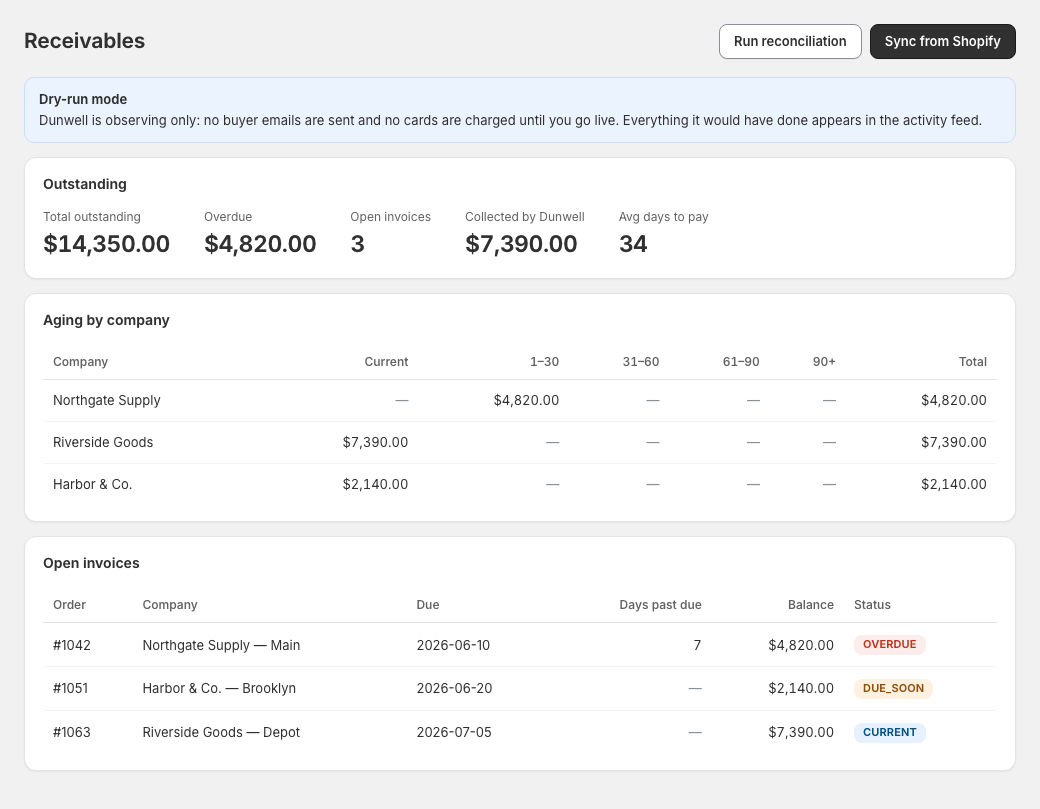
Every net-terms invoice in one place, current, due soon, and overdue, with a glance at which buyers can be auto-charged. Click to enlarge.
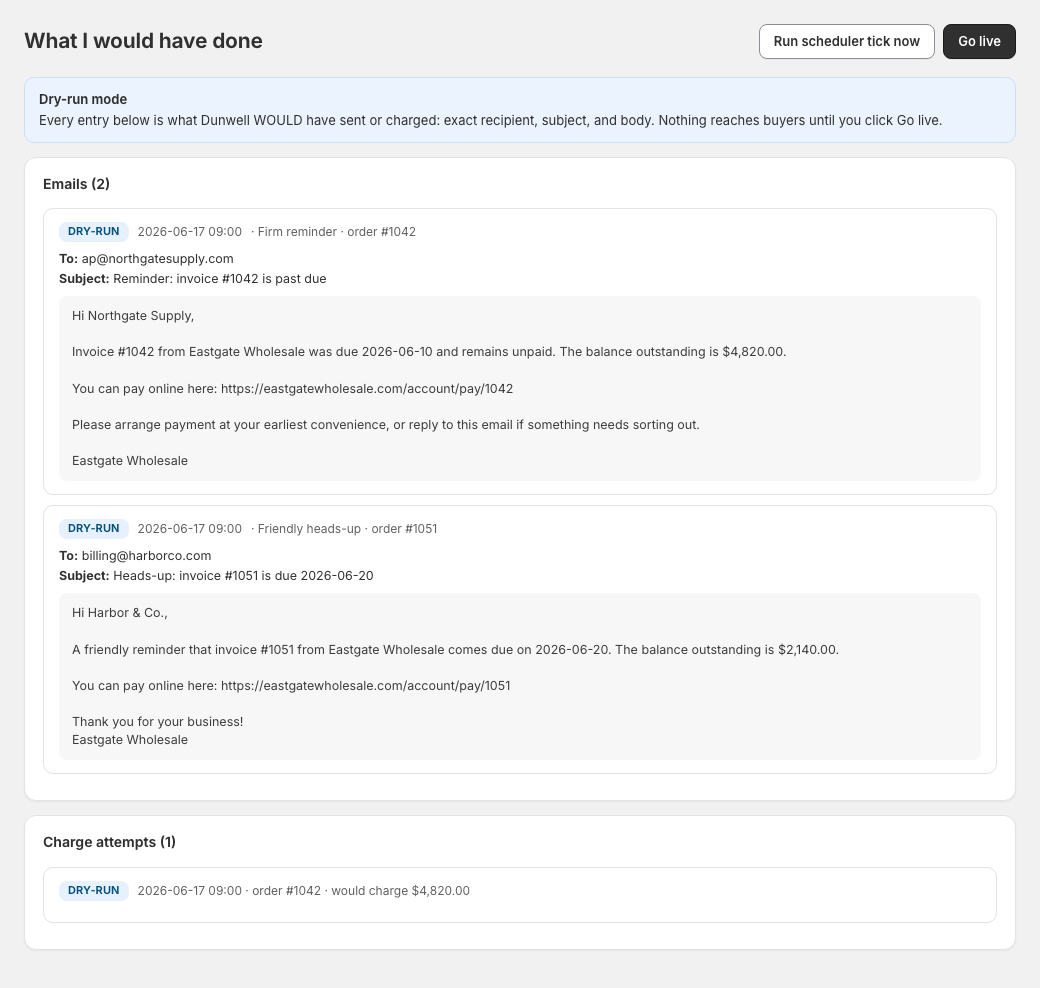
See the exact recipient, subject, body, and charge that would go out, before a single action is real.
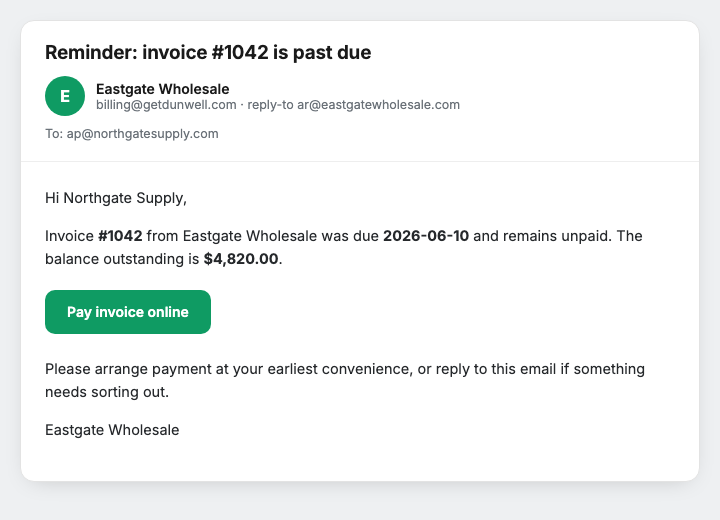
Your logo, your reply-to, and (once set up) your own sending domain, with an easy pay-online link. Clear and simple to settle.
Connect your store, set your rules, and watch it run in dry run before a single email or charge goes out.
Install from Shopify. Dunwell syncs your net-terms orders, companies, and due dates automatically.
Set your reminder ladder, grace days, and credit limits per company location. Edit the email copy.
Dry run shows exactly who would be emailed and which cards would be charged, with no real action taken.
Flip the switch. Reminders send, due cards charge on time, and every action lands in the audit trail.
The money path is conservative on purpose. These are the rules Dunwell will not break.
The app does nothing real until you explicitly switch it live. Preview first, always.
What is actually owed is re-fetched at charge time, so a buyer is never billed on stale or already-paid data.
Enforced at the database level. No duplicate charges, even if something retries.
A hard decline stops the line and is flagged for follow-up. Dunwell will not hammer a dead card.
Dunwell holds a secure mandate reference, never card numbers, and never writes secrets to logs.
Every attempt is recorded before it runs, so the trail is complete even if a process dies mid-charge.
Free to start. Paid plans from $19/mo, billed through Shopify. Built for non-Plus wholesale stores on Shopify Payments.
See everything you're owed.
Collect on every invoice.
Net terms that pay themselves.
Billed through Shopify. No per-invoice fees, no percentage of what you collect. Auto-charge needs Shopify Payments and a buyer card saved at checkout; ACH, check, and wire buyers get the dashboard and reminders. Run in dry run as long as you want, and the kill switch stops everything in one click.
The things every finance lead asks before trusting an app with the charge.
Join the early-access list. We will reach out within one business day to get Dunwell on your store.
No install to join. You start in dry run, so nothing sends or charges until you say go.
Built by TwoOneFive Ventures LLC on Shopify's official Billing and Payments APIs · billed through Shopify · early-access stores get hands-on onboarding.